


Reliant
4.82.80K Reviews
App Specs
- Version
- 9.9.0
- Updated On
- License
- Free
- Downloads
- 500,000+
- Developer
- Reliant Energy Retail Holdings, LLC.
- Categories
- Business
- Platform
- Android
Screenshots

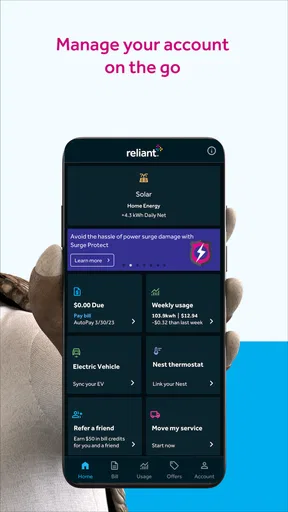
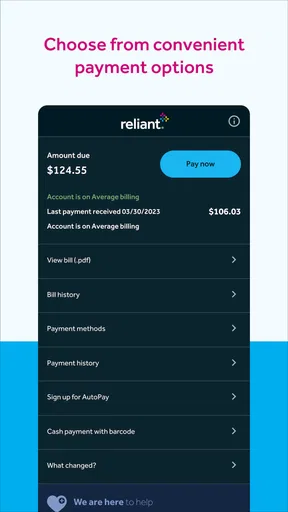
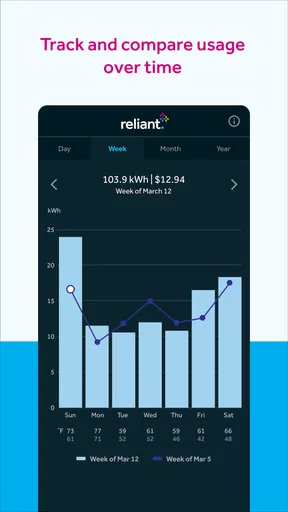
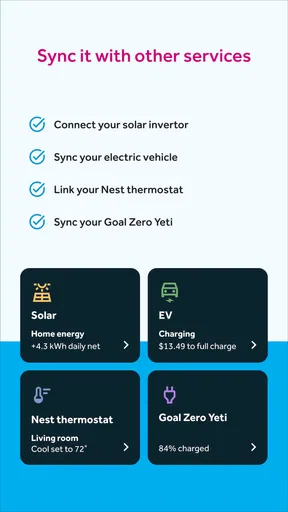
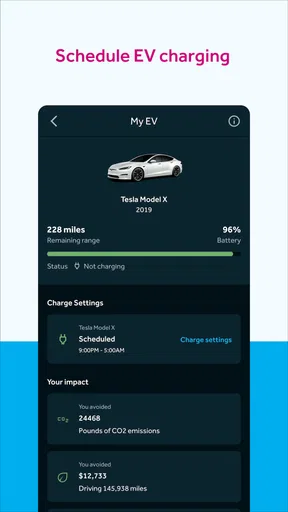
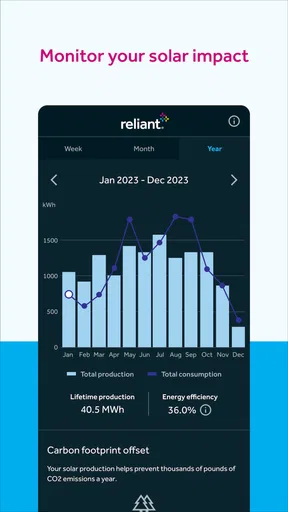

 Analysis by AppCompare
Choosing an energy account app is less exciting than choosing a streaming service, but it can make ordinary household tasks much less annoying. I spent time using Reliant as a mobile companion for energy-account management, and my main takeaway is simple: it is most useful when you already deal with Reliant Energy and want a quicker way to keep track of that relationship. It is not a universal electricity comparison tool, and it does not replace the provider itself. Instead, it puts provider-related tasks closer to hand on an Android or iOS device.
That distinction matters before you install it. Reliant Energy Retail Holdings, LLC. develops the app, which sits in the Business category and is free to download. The app is rated for Everyone, so it is aimed at a broad household audience rather than a specialist business user. Its store summary, “Power Your Way,” is brief, but the practical question is whether the app saves you time compared with using a browser, calling support, or managing reminders separately.
What I looked for before recommending it
My decision criteria were deliberately practical: how quickly I could reach account information, whether the app made routine energy tasks easier, how much value it offered to someone already using the provider, and whether it gave a good reason to choose mobile access over the usual alternatives. I also considered the less obvious cost of switching: learning another account interface, allowing notifications, checking information on a smaller screen, and remembering that the app is tied to one energy company.
That last point is the most important. A provider app should be judged as a service companion, not as an independent energy-management platform. If you are comparing electricity plans across several companies, your needs are different from those of someone who simply wants to handle an existing Reliant account without opening a laptop. I would therefore decide first whether the problem is account access or energy shopping. This app is designed around the former.
The app has been available since July 12, 2013, and the current version is 9.8.0. It requires at least iOS or Android version 10, which keeps the compatibility requirement relatively familiar for people using an older but still supported phone. That does not guarantee that every screen will feel identical on every device, but it does make the app accessible to a wide range of everyday phones.
Its public response is also strong: the app holds a 4.8 average from around 9,200 ratings, with roughly 2,800 written reviews, and it has passed 500,000 installs. I treat those figures as useful context rather than proof that every household will have the same experience. A high rating suggests that many people find the app worthwhile, but the right fit still depends on whether you are a Reliant customer and how often you need account access.
The everyday problem it solves
Imagine noticing that the temperature has changed sharply before leaving for work. You want to check your energy account, review what is happening with your service, or take care of a routine task without waiting until you are back at a computer. In that situation, a dedicated provider app is convenient because it keeps the account relationship in one place instead of making you search through a browser bookmark, an email, or a paper bill.
Worth Reading Before You Choose

EA SPORTS FC Mobile 26 Is a Bigger Football Game, but It Takes Time

Flipboard Shows What News Apps Must Do Beyond the Feed

Switching to Android Auto Means Rethinking Your Driving Routine

Google Calendar Makes a Crowded Week Easier to Manage

Ludo King Makes the Most of the Minutes Between Plans

Baby Panda World Brings Quick Play to Modern Phones, but Its Game Library Feels Busy
I also found the mobile format useful for short, interrupted moments. You can reach for the phone while standing in the kitchen, between errands, or while helping a family member with a household question. That sounds minor, but energy administration is exactly the kind of task people postpone when it requires a longer session. The app’s value comes from reducing that friction, not from turning electricity management into something entertaining.
Another realistic use case is shared household responsibility. One person may normally handle energy matters, while another notices a question about the account or needs to check something while away from home. Having a mobile route can make that handoff easier than relying on a single computer or asking someone to forward account details. I would still be careful about account security and would not casually share login access, but the mobile format supports a more flexible routine.
Where the app feels strongest
The clearest strength is focus. Because Reliant is connected to Reliant Energy rather than trying to serve every provider, the experience is easier to understand for an existing customer. You are not starting with a marketplace full of unrelated plans or a general-purpose budgeting dashboard. You are opening an account-specific tool, which is exactly what many people want after choosing their energy provider.
The strongest reason to install it is convenience for recurring account tasks. If you check your energy information regularly, prefer handling bills and service questions from a phone, or dislike navigating a full desktop website, the app can become a useful part of your household routine. It is especially sensible for customers who already rely on their phone for banking, shopping, and other administrative work.
A less obvious advantage is that a provider app can help you separate energy administration from broader financial apps. A budgeting app may show that a utility payment exists, but it usually does not provide the provider-specific context needed to understand the account. Conversely, a browser can provide access but may require more steps: open the browser, find the correct page, sign in, and navigate through menus designed for a larger screen. A dedicated app gives that task its own doorway.
I also like the fact that the app is free. There is no extra purchase decision just to try it, which lowers the cost of testing whether mobile account access fits your habits. Free does not mean it is useful to everyone, though. The real value depends on your relationship with Reliant, not on the download price.
Small habits that make it more useful
My first practical tip is to use the app as a checkpoint rather than opening it only when something goes wrong. A quick, regular glance can help you stay familiar with your account and notice questions earlier. I would not turn that into constant checking; the point is to create a predictable habit that replaces last-minute searching.
Second, keep the app in a clearly named folder with other household tools rather than burying it among entertainment apps. That sounds like a phone-organization detail, but it matters for administrative software. If reaching the app takes several swipes, you are more likely to return to the browser or postpone the task. The benefit comes from making access nearly automatic.
Third, use the phone’s own reminders alongside the app for deadlines or follow-up actions. I would not assume that a provider app should replace a personal calendar. The app is the place to handle account information; your calendar is the better place to remember a future task. Separating those roles gives you a more reliable workflow than expecting one application to do everything.
A fourth useful habit is to check account-related information when you have a stable connection and enough time to read carefully, rather than rushing through a task while distracted. Energy accounts involve household finances and service details. The smaller screen is convenient, but convenience should not lead to tapping through a process without checking what you are confirming.
Where alternatives may fit better
The main alternative is the provider’s website. For occasional use, the website may be perfectly adequate, especially if you dislike installing apps or want to keep fewer services on your phone. A browser can also feel better on a large screen when you need to read several pieces of account information at once. If you only sign in a few times a year, the app may not save enough time to justify another installation.
Calling customer support is another alternative, and it remains the better choice when your situation is complicated, urgent, or difficult to explain through a mobile interface. An app can make routine access easier, but it cannot remove the need for human assistance in every case. I would choose direct support when a service issue requires detailed back-and-forth, when an account needs special attention, or when I am unsure what an on-screen option means.
General budgeting apps occupy a different category. They may be better if your priority is seeing energy spending beside rent, groceries, transport, and other household costs. A provider app is more focused, while a budget tool offers a wider financial picture. I would not choose Reliant as a replacement for that broader overview. I would use the two types of tools for different jobs if both were important to me.
Energy comparison services are also a different option. If you are moving, shopping for a new plan, or trying to compare providers, a single-provider app is not the natural starting point. The app makes more sense after the provider decision has already been made. This is the most important situation in which I would recommend another category first: when your question is “Which plan or company should I choose?” rather than “How do I manage my existing Reliant relationship?”
There is also a trade-off between specialization and flexibility. Reliant’s focused approach can be clearer for its own customers, but it is less useful if you manage several properties with different providers or want one neutral dashboard for all utilities. In that case, a browser routine, a spreadsheet, or a broader household-management tool may be more practical, even if those options feel less polished.
What switching to the app really costs
Because the app is free, the financial cost of trying it is low. The more meaningful cost is setup and habit change. You need to install it, sign in, understand where the information you care about is located, and decide whether notifications are helpful or distracting. None of that is difficult, but it is still a small amount of administrative work.
I would also think about phone storage and attention. Every extra app competes for space, updates, and a place on your home screen. If you already have a smooth browser shortcut for your Reliant account and rarely use it, the dedicated app may not change much. If you regularly forget to check the account because the website is inconvenient, the same installation may pay for itself in saved effort, even though the app itself is free.
The operating-system requirement is another practical consideration. The app needs version 10 or newer, so I would check the software version on an older phone before planning around it. For most current devices this should not be a major obstacle, but it is worth knowing before deleting an existing browser shortcut or relying on the app for an immediate task.
Privacy and security also deserve ordinary common sense. I would use a strong, unique password, avoid signing in on a shared device, and keep the phone protected with its normal lock screen. Those steps are not special features of this app; they are sensible precautions for any application connected to household services and payments. I would also review notifications so that useful reminders do not become background noise.
One subtle switching cost is expectation. Installing a provider app can make you assume that every energy question will be answered inside it. That may not be true for complex service matters or broader plan comparisons. I recommend treating the app as one part of a workflow: use it for convenient account access, keep your calendar for follow-ups, and know when the website or customer support is more appropriate.
Who should install it, and who should skip it
I would recommend Reliant to an existing Reliant Energy customer who prefers mobile account management, checks household services from a phone, or wants a dedicated alternative to opening a browser. It is also a sensible choice for people who handle shared household administration and value quick access while away from a desk. The free price and Everyone age rating make it easy to try for a broad range of users.
I would be more cautious if you are only researching energy providers. The app is not the first tool I would reach for when comparing the market. I would also skip it if you strongly prefer phone support, rarely use mobile apps for bills, or already have a browser workflow that is fast and reliable. Installing an app simply because it exists is not an improvement if your current method causes no friction.
People managing multiple providers should consider a broader solution first. A single-provider app can be excellent at its own lane while still being inconvenient for a household with several utility accounts. In that situation, I would use a neutral organizational method for the overall picture and keep the provider app only if its specific access is genuinely faster.
My final recommendation
After weighing the alternatives, I see Reliant as a practical companion rather than an essential app for everyone. Its purpose is narrow, but that narrowness is also its advantage: customers of Reliant Energy get a direct mobile route to their provider relationship instead of having to treat an energy account like a special browser chore.
I recommend trying it if your goal is simpler, more regular access to an existing Reliant account. Give it a place in your household routine, pair it with your phone’s reminders, and judge it by the time and hesitation it removes. If your goal is comparing providers, building a complete household budget, or resolving a complicated service issue, start with a comparison tool, a budgeting system, or customer support instead.
In my view, the high user response, long availability, free access, and current version 9.8.0 make it a reasonable download for the right customer. Just keep the decision grounded in your use case. Reliant is at its best when it replaces repeated browser visits with a focused mobile doorway; it is not meant to be your entire energy strategy.
Pros
- Simple interface makes core features easy to find.
- Useful for staying connected with Reliant-related services.
- Account information can be accessed from a mobile device.
- Convenient alternative to using the full website.
- Notifications can help users keep track of important updates.
Cons
- Some features may require an active Reliant account.
- Performance can vary depending on connection quality.
- The app may feel limited for users outside the Reliant ecosystem.
- Certain tasks may still redirect users to a web page.
- Notifications may become excessive without careful settings.
FAQs for Reliant
What is Reliant and what can I use it for?
Reliant is an application designed to help users manage and access its core services from a mobile device. Depending on the version and region, it may provide account tools, service information, notifications, support options, and other practical features. Before downloading, check the app’s official description to confirm that its available functions match your needs and location.
Is Reliant free to download and use?
Reliant may be available as a free download, but some services, transactions, subscriptions, or optional features could involve additional costs. The exact pricing depends on the provider, your region, and the type of account or service you use. Review the terms, in-app pricing, and any applicable fees before confirming a purchase or activating a paid feature.
What information or permissions does Reliant require?
During setup, Reliant may request access to information needed for account creation, authentication, customer support, notifications, or location-based services. The permissions can vary according to your device and the features you choose to use. It is advisable to read each permission request carefully and only grant access that appears necessary for the app’s intended functions.
Is Reliant safe to use on Android and iPhone?
Reliant should be downloaded only from an official app store or a verified source to reduce the risk of installing an altered or unsafe version. Keep the application and your operating system updated, use a strong password, and avoid sharing login details. For sensitive accounts or payments, also review the provider’s privacy policy and security guidance.
What should I do if Reliant does not work correctly?
If Reliant crashes, will not sign in, or fails to load information, first check your internet connection and install any available update. Restarting the app or device can also resolve temporary problems. If the issue continues, consult the in-app help section or contact official support with your device model, operating system, and a clear description of the problem.


